Announcement

Collapse
No announcement yet.

Quick YUV2 Marvel w2k/xp question

Collapse
X
 
  • Filter
  • Time
  • Show
Clear All
new posts

  • Quick YUV2 Marvel w2k/xp question

    I'm just wondering how to enable YUV2 capture with the G400 Marvel in W2K or XP? I noticed that the Flying Dutchmans YUY2 Patch in the MatroxUsers vid utilities area warns not to even try it with W2k/Xp. How is everone doing it? Any suggestions would be appreciated.

    Oh and buy the way, I've read posts where people are capturing full res YUV. If anyone who reads this has done so, how is this possible? Do you have a RAID setup?

    Thanks in advance.

    AMD Athlon 800
    Asus K7V
    392 MB PC-133
    Matrox Marvel G400
    Creative SBLive!
    Maxtor 30gb 7200rpm
    Maxtor 60gb external firewire 7200rpm
    Windows 2000 SP2 / Windows 98 Dual Boot
  • #2
    With most of the Win2K/XP drivers the YUY2 activation is already in there but the native PC-VCR capture tool won't usually show it. Alternative capture tools like AVI_IO do show the YUY2 interface.

    Full rez YUY2 has a 20 mb/s bitrate so a RAID does indeed help, but if you're using AVI_IO or VirtualDUB as a capture tool (I prefer AVI_IO) you can also select an optional compressor (codec). If one uses HuffYUV then you cut the bitrate down to 10 mb/s for full frame without any loss of quality (Huffman compression is lossless). If you use PICVideo's software MJPeg codec you can capture nearly lossless MJPeg at about 8 mb/s using its quality settings of 20.

    My analog systems all use Promise Fasttrak RAID cards. They run from an 80 gig Fasttrak 100 RAID0 to a 640 gig Fasttrak SX4000 RAID5 in one of my larger systems.

    All work great for analog capture at high bitrates, but the results are best on Intel or SiS chipped systems. VIA chipped systems are highly limited in their PCI bandwidth and this cuts the maximum throughput you can expect.

    Dr. Mordrid
    Dr. Mordrid
    ----------------------------
    An elephant is a mouse built to government specifications.

    I carry a gun because I can't throw a rock 1,250 fps

    Comment


    • #3
      Thank you very much for the info Dr Mordrid. If you have the time I have a couple follow-ups I'll throw your way.

      First and most important, when you use HuffYUV to capture/ compress a file, do you also use the HuffYUV codec in your editing application, or do you use the matrox hardware or other codec? What program do you use? Premiere hates my Matrox MJPEG, so I had been using the Morgan Codec for a while until I switched to Avid Xpress DV. Avid hates all avi files (though I'm interested to see how the HuffYUV will transcode in Avid), so I think I'll be going back to premiere for all analog sourced projects.

      When you say you use the HuffYUV as an optional compressor in AVI_IO, does that mean that this codec is Recompressing the captured YUY2? Or does the matrox hardware do nothing but capture and the compression is left up to the HuffYUV codec? The reason I ask is when I go to "Format" and the Matrox VidCap window pops up, YUY2 is selected (and from there I can adjust the settings), and when I go to "Compression", the default seting is "no Recompression." I'm just curious if, when selecing the HuffYUV codec, the Matrox YUY2 (not sure if its a software codec or part of the hardware) is doing anything or not. I hope this makes sense...basically, is the HuffYUV compressing or recompressing?

      The whole YUV and YUY2 thing is kind of confusing me. Not sure what YUY2 means and if it has any similarity to YUV other than similar letters.

      Another stupid question: I was under the impression that YUY2 was uncompressed like RGB. If so, why the huge difference in MB/s? Is the color space different? YUY2 is 4:2:2, correct?

      Thanks again for your time and help.

      Comment


      • #4
        The Matrox hardware & drivers deliver the raw YUY2 stream produced by the card (YUY2 is a subset of the YUV data type) to the capture program which then uses HuffYUV to compress it. From there it acts like any other codec except that it's lossless.

        On analog systems I use HuffYUV as the editing codec, meaning that I have a custom MediaStudio Pro profile set up using it as the defined compression. Being lossless HuffYUV makes compositing effects, overlays, titles, animations & graphics without introducing artifacts much easier.

        HuffYUV is totally useless as a playback codec, so it's best to encode the project to a more efficient format for that. MPEG-2 or PICVideo MJPeg are my favorites.

        As noted YUY2 is a subset of YUV. Unlike RGB where you store each level of red, green and blue as single values YUV stores lumance as well.

        Y = lumance (grayscale)
        U = Cb = chroma blue
        V = Cr= chroma red

        chroma green is obtained using the other 3 components;

        G = 1.164(Y - 16) - 0.813(V - 128) - 0.391(U - 128)

        There are many flavors of YUV, a couple of the most commonly used being YUY2 and its sister UYVY. They are distinguished by their fourCC's (four character codes), which is what YUY2 etc. are. Windows identifies the video format by these codes. Another example of a fourCC is DMB1, which is the fourCC for the Matrox MJPeg codec used by the Marvel & RainBow Runner cards.

        YUV is a bit more efficent at packing color information than RGB because it's clamped to a lower max intensity than RGB's range of 0-255. YUY2 is also a packed format. These two factors give it a lower bitrate.

        HuffYUV compresses the YUY2 even further using Huffman lookup tables. Huffman encoding is lossless, so you get the smaller files at no cost other than the CPU cycles it takes up.

        End results:

        640x480 RGB: 27 mb/s
        704x480 RGB: 30 mb/s
        704x480 YUY2: 20+ mb/s
        704x480 HuffYUV (Huffman encoded): 10-11 mb/s

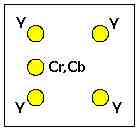
        As for the colorspace specs the most commonly used are;

        4:4:4 = one color sample/horizontal pixel (studio)
        4:2:2 = one color sample spread across 2 horiz. pixels (broadcast)
        4:1:1 = one color sample spread across 4 horiz. pixels (NTSC DV cams)
        4:2:0 = used in DVD video and PAL DV cams. Skips every other line of chroma samples;


        (MPEG-2 version shown)

        although some realtime boards like the Matrox RT.X100, RT.X10 and RT-2x00's use 4:4:4:4 RGBA (A=alpha channel) on their timelines.

        This is especially important when compositing NTSC miniDV footage because its chroma samples are spread across 4 pixels. This makes compositing artifacts the rule instead of the exception.

        On these boards DV video is upsampled and the alpha channel provided to enhance the quality of composites. Bi-linear and anisotropic filtering is also done to enhance the overall quality. Additional processing is done to provide matte chokes when doing keys in the RT.X100's realtime keying engine.

        Dr. Mordrid
        Last edited by Dr Mordrid; 12 September 2002, 01:33.
        Dr. Mordrid
        ----------------------------
        An elephant is a mouse built to government specifications.

        I carry a gun because I can't throw a rock 1,250 fps

        Comment


        • #5
          Wow, great info, thank you very much. I'll bug you one last time with an easy one. What configuration setting do you use for HuffYUV in AVI_io? I assume the best settings:

          YUY2: Predict Median
          RGB: Predict Gradient

          What exactly do the enable RGBA and always suggest RGB output checkboxes do? I have neither checked. Do you ever use either?

          Thanks again.

          Comment


          • #6
            YUY2 Predict Median works for me for general editing.

            I don't use RGB video much, but once in a while....mainly in heavy effects sequences where there will be many layers in a composite.

            The RGBA encoding adds an alpha channel to the video stream, but it only does any good with an application that can save a 32 bit *.avi file. MSPro cannot but Uleads Cool3D animation program can. So can many 3D apps.

            Dr. Mordrid
            Dr. Mordrid
            ----------------------------
            An elephant is a mouse built to government specifications.

            I carry a gun because I can't throw a rock 1,250 fps

            Comment


            • #7
              Thanks yet again

              Comment

              Working...
              X