If this is your first visit, be sure to
check out the FAQ by clicking the
link above. You may have to register
before you can post: click the register link above to proceed. To start viewing messages,
select the forum that you want to visit from the selection below.
Yes, and he conveniently forgets facts such as the 24p framerate of movies. All movies are shot at 24p, everything at 60Hz has been transcoded by 3:2 resulting in judder.
Are you content with 1080p acquired at a mere 24 frames per second?
Yes or no?
Or are you attempting to convince me that 1080p is acquired at a full 60 frames per second? If so, prove it. Post a link to where that's being done in Hollywood.
It's that simple, Elie.
C'mon. As the saying goes... "Put up or shut up."
Prove your point.
I will say it again:
There is virtually no 60 frames per second 1080p acquisition.
1080p acquisition is limited to 24 frames per second or 30 frames per second.
What you seem to be thinking as higher resolution is actually a compromise when it comes to frame rate.
I do not believe that sacrificing the frame rate is a good thing.
That's why 720p at a FULL 60 FRAMES PER SECOND is -- in reality -- the superior format.
Remember, we're talking about *moving* pictures and not still pictures.
Consequently, 1920 x 1080 pixels at a crippled frame rate is not going to capture action as well as 1280 x 720 pixels at a full 60 frames per second.
I emphasize that we're talking about *moving* pictures.
The movie industry has embraced 1080p24 (24 frames per second; no 60 frames per second) as a mastering format in both native 24p form and in 24PsF form. ... A new high-definition progressive scan format is not available for picture creation, but is currently being developed to operate at 1080p at 50 or 60 frames per second.[2][6] This format will require a whole new range of studio equipment including cameras, storage, edit and contribution links as it has doubled the data rate of current 50 or 60 fields interlaced 1920 × 1080 from 1.485 Gbit/s to nominally 3 Gbit/s. It is unable to be broadcast in a compressed transmission to legacy MPEG-2 based HD receivers. This format will improve final pictures because of the benefits of "oversampling" and removal of interlacing artifacts.
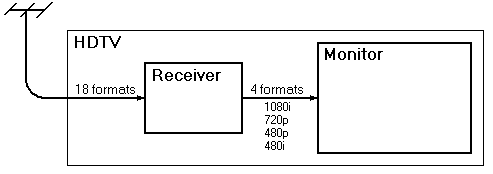
Most TVs with 1080p capability execute this function by upscaling 480p, 720p, and 1080i input sources to 1080p for display on the screen. In essence, the 1080p function on your TV may be done with internal scaling or processing only and not be able to accept 1080p external source.
But for now, there is no 1080p programming. There is 1080i and 720p programming—all the HD broadcasts are one or the other, depending on the broadcaster. So the 1080p display upconverts the 1080i or 720p picture by using some kind of software interpolation or line doubling. What's the likelihood of broadcasters ever delivering 1080p pictures? Pretty slim. It's hard enough to fit a 1080i picture into a 6 MHz wide broadcast channel, which can carry a payload of up to 19 Mbps. With a picture content of double 1080i, a 1080p signal just won't fit. Or at least, it won't fit using MPEG-2 picture coding. It might fit using AVC or VC-1 advanced picture coding, but broadcasters don't have any plans to do that.
So, Elie, you and Mark think that 1080p @ 60 frames per second isn't important; you're willing to settle for 1080 acquired at 24 frames per second.
That seems to be a "crippled 1080p" format.
CHALLENGE
Provide one link -- just one -- to any Blu-ray title containing video that was truly acquired using 1920 x 1080 pixels AT A FULL 60 PROGRESSIVE FRAMES PER SECOND.
You can't because that Blu-ray title does not exist.
You're both suffering from pixel-envy.
And you've bought into the most common 1080p myth.
Jerry, I am not talking about broadcast, I don't care about it what so ever.
The point I am trying to make is that Blu-Ray now the winner will not go the way of disco as you keep pointing out. Broadcast will have two means to provide content to home viewers...
1) Digital TV, via either Satelite or cable. both supporting up to 720p
2) IP based solutions example IP-TV, again support up to 720P
So either of these delivery methods is ok for TV, they may eventually go 1080i if compression get's better over the years, but people will live with 720p for now and it's fine.
Now... If I want to watch an HD movie, there is no way in hell I am going to either download a movie at 720p from a provider or wait for my TV company to view it at 720p any time soon, if I have the hardware (Blu-ray + 1080P LCD set + kick ass audio surround system) I am going to buy or rent a blu-ray movie and watch it at the best res AND audio quality I can possibly get, you got it...1080p.
1080P is not as you claim, a marketing hype, it's real I have seen it, I have even seen 4Kx2K video from a 4K camera played back on a $20,000 LCD at NAB, and let me tell you that was amazing.
I recommend that everyone who loves movies at the best quality to go and buy 1080P TV's and a Blu Ray player because that's the only way asside from HD-DVD players to get full 1080p.
Blu-ray media will be for people wanting to have a good archive of movies, who like to collect special editions etc. while Apple TV is a good choice for people who want to watch the daily news or the odd movie on TMN, however when it comes time to watch a movie with family and friends, the prefered choice will be Blu-Ray.
1. Virtually all 1080 programming is acquired as 1080/24p
2. Virtually all 1080 programming is distributed as 1080i.
A 1080p TV must process 1080i -- artificially -- to display 1080p so that it doesn't look crappy.
Just having 1920x1080 pixels at your disposal doesn’t mean much if your HDTV doesn’t fully process 1080i signals. That means splitting each frame into two fields with 540 odd and even lines, then integrating them into full 1080 frames with three-axis motion interpolation.
These steps require quite a bit of processing power, but are worth it when you consider that all 1080 HD content transmitted by North American cable head ends, satellite services, and broadcast stations is in the 1080i/29.97 format, even movies that originated as 1080p/24 edit masters.
Movies tolerate the interlacing process much better than live HD programs. Sports in particular have all kinds of interlaced artifacts that must be cleaned up during the conversion to progressive scan. Simple “weaving†together of the odd and even fields won’t cut the mustard on a large 1080p set – you’ll see any shortcomings in the HDTV’s processor pretty quickly.
The other problem with 1080i signals is that they are usually overcompressed, resulting in aliased curves and mosquito noise. Add those MPEG artifacts to an interlaced signal and you’ve got quite a mess to straighten out — one which won’t be as obvious on a 34-inch CRT or even a 42-inch plasma, but one which will leap off a big screen TV. Once again, the display may be too good for the delivery system!
CLOSE ENOUGH FOR GOVERNMENT WORK?
When all is said and done, 1080p isn’t for everyone, even though it will become the default resolution for some segments of the HDTV display market over the next year. For many of you sitting on the sidelines, you haven’t missed much as market and technical realities are finally catching up with all of that early 1080p hype and buzz.
Are you a die-hard sports nut? Watch a lot of ESPN, ABC Sports, or Fox Sports in HD? All three networks cover and broadcast sporting events in the 720p/60 format, so an HDTV with that resolution is more than adequate, unless you are sitting right on top of the screen.
For those who suffer from pixel-envy and are humiliating yourselves by submitting to the 1080p marketing b.s., I would suggest you read this excellent article:
To best understand the migration from 720p and 768p resolution to 1080p flat-panel and rear-projection displays, you need to consider market economics above all. The main reason any manufacturer would want to sell a 1080p rear-projection TV is that they can charge more for it than a 720p or 768p. Simple as that! ... For many of you sitting on the sidelines, you haven’t missed much as market and technical realities are finally catching up with all of that early 1080p hype and buzz.
...are good examples of miniature pocket camcorders.
The Sanyo shoots progressive.
The Panasonic shoots interlaced.
The Panasonic model compresses with MPEG-2, which is less efficient than the Sanyo's MPEG-4, but the Panasonic's peak data rate is nearly three times as high.
The Panasonic is best for people who want a format that can go directly to DVD-video disc with display on an interlaced tube TV.
If you want to display the Panasonic video on the Web, then you'll need to deinterlace the video (or one could use a player that could deinterlace on-the-fly) and convert to a Web format.
The Sanyo is a great Web camcorder and the video looks plenty crisp on flat panel progressive displays.
However, both camcorders lack microphone inputs.
Bad.
The built-in mics pick up sound from generated by the camcorders themselves.
With the Panasonic, you have to put it on a tripod. If you don't put it on a tripod, its auto-focus mechanism will create a buzzing sound that picks up on the memory card recordings. However, the Panasonic zoom is silent.
With the Sanyo, you can move it around all you want and you won't hear any auto-focus mechanism on the memory card recordings. However, if you use the zoom while you are recording, you'll pick up the noise of the zoom on the recordings.
So both camcorders illustrate the difficulty the manufacturers are encountering as they try to meet the demand of people who want tiny pocket camcorders.
I then exported from "MPEG Streamclip" using FILE > EXPORT TO MPEG-4 and I was then presented with Apple iTunes > APPLE TV encoding options.
I selected the option to re-encode my Panasonic files using the following parameters:
H.264
640 x 480 @ 4.92Mbps
29.97 frames per second
MPEG-4 audio stereo @ 256Kbps (48Khz sampling rate)
I then imported this converted file into Apple iTunes and it played splendidly... the re-encode even preserved the interlace so that it would display on the interlaced tube TVs perfectly.
Wow.
That was cool.
My next experiments will be with the high definition video/audio recorded by the Sony HDR-UX1 AVCHD camcorder.
When set to record at highest possible quality, the SANYO VPC-CG6 records MPEG-4 with an .MP4 extension to 640 x 480 resolution, 29.97 frames per second, at 3Mbps. Stereo audio is sampled at 48Khz at 125Kbps.
I imported this video into Apple iTunes on my computer.
I then streamed it -- live -- to my Apple TV for display on my TV and it played perfectly over my 802.11g wireless network.
For people who only want standard definition, this is amazing.
Because all of your family video can be stored on a hard disk of your computer and streamed to your TV -- wirelessly.
In addition, the Sanyo camcorders record to memory cards.
And you can do editing in the camera itself.
If you have a faster 802.11n wireless network, you can stream high definition camcorder video.
The cool thing is the Apple software.
The Apple TV's software interface is superb.
It's gives you a nice-looking menu -- automatically -- without the work of having to go into a DVD authoring program.
The most powerful Mac laptops and desktops ever. Supercharged by Apple silicon. MacBook Neo, MacBook Air, MacBook Pro, iMac, Mac mini, and Mac Studio.
Even with my slower 802.11g speeds, I'm able to stream standard definition video content -- without a glitch -- to my television!
So, the *only reason* that I can see to ever use the hard disk on the Apple TV is to watch high definition video rentals and even high definition videos will stream wirelessly from your computer if your wireless network is a pure 802.11n network.
BUT... even with the slower 802.11g wireless network, there's no reason to use the hard disk on the Apple TV for any purpose (other than 720p movie rentals) because you can stream any other content from any hard disk in your house... podcasts... YouTube... standard definition videos... music... photos... etc.
This device is going to change the way the world consumes information and motion picture entertainment. Pure and simple.
Apple calls them “high-definition movie rentals,” but to people familiar with Blockbuster Video, Netflix, and HD cable box alternatives, Apple ...
Apple TV 2.0 vs. Blu-Ray, DVD & HD Cable: The Comparison
We used a very recent 40†Sony Bravia XBR4 television with 1080p and 120Hz support for our testing, and set all of our HDMI-connected playback devices to display at their best possible resolutions: the Blu-Ray Disc player was a PlayStation 3 console at 1080p, the Apple TV was set to its new 1080p mode, the Scientific Atlanta cable box was set to its maximum of 1080i, and the DVD player was the same PlayStation 3 at 1080p, set on normal upscaling mode. Four test screens were picked as representative of the film’s content, and a Nikon camera was used to shoot each paused screen at 1/80 of a second.
What We Saw
While the Blu-Ray version was the clear winner of the bunch, we were surprised by how well the Apple TV fared in comparison to the other formats we tested.
What impressed us about the Apple TV rental was that the video, despite needing to be sent over the Internet rather than residing comfortably on a DVD or Blu-Ray Disc, exhibited little in the way of motion blur or compression artifacts—it looked as good as could be expected from 720p, which is to say comfortably better than DVD quality, but shy of the best a Blu-Ray Disc can offer on a top TV. The Apple TV video also contained a Dolby Digital 5.1 surround audio track, which the HD cable version did not, and its sound didn’t suffer from obvious compression issues like the cable version did.
It’s also worth noting that the Blu-Ray Disc’s biggest video and audio advantages are real, but will be lost on many HDTV users. Since the majority of HDTVs sold before 2007 were not capable of displaying true 1080p output—most were capped at 720p or 1080i—the superior video quality of the Blu-Ray versions of movies won’t be noticeable on such sets, and the difference between the Apple TV and Blu-Ray versions will be less noticeable. If you’re using a TV without the ability to display 1080p video—especially if you don’t have a receiver capable of decoding the Blu-Ray Disc’s DTS-HD signal—an Apple TV rental will be an almost complete substitute for renting the Blu-Ray.




Leave a comment: